
Some time ago, I got a Korg B1 digital piano with several non-working keys from family. They had already tried repairing it, but that had not worked out. I fixed the keyboard PCB and, while the piano was open, found an unused MIDI header that was actually transmitting MIDI data. A logic analyzer, PulseView and a Python program were enough to turn that into a working MIDI input on my computer.
Repairing the keyboard PCB
First, I repaired the broken key. The fault was a failing transistor in a corroded area of the keyboard PCB. In the following image I had already desoldered the transistor, and made a bit of a mess:
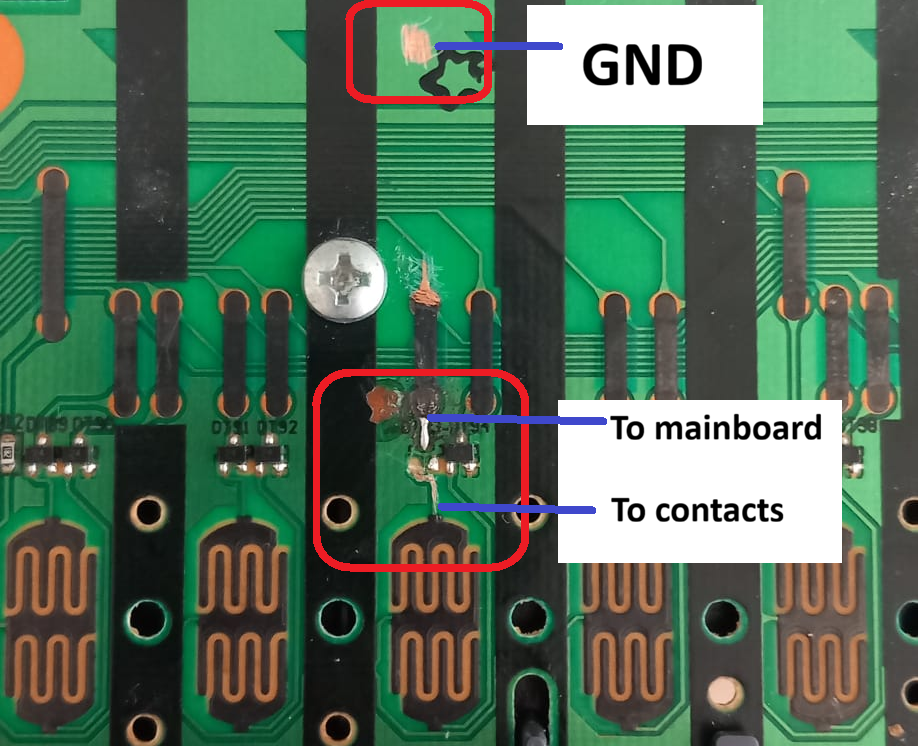
Visible on the board are the contact pads for the piano keys. There are two contacts per key. They close at different points in the key travel, allowing the piano to calculate the velocity from the time difference between the first and second contact closes. A shorter time is a faster/harder key press.
Above the contact area are two transistors for the two contact paths. These are part of the interface between the keyboard contacts en the scanning elecronics. The transistors are used for low-current control by the main PCB.
Above the transistors are the black PCB jumpers. These bridge other copper traces, providing a crossing without an electrical connection to the track underneath. Together with the repeated contact patterns, they make the routing of the keyboard board quite interesting to inspect.
DTC114ECA → BC547 + 2 × 10 kΩ
To replace the transistor, I first needed to identify it. The only inscription on the package was “24”. A multimeter and some Google searching suggested that it was probably a DTC114ECA.
The DTC114ECA is a NPN-transistor with 2 built-in 10kOhm resistors: R1 = 10 kΩ from the input terminal to the base, and R2 = 10 kΩ from base to emitter. The external terminals are therefore input, output/collector and ground/emitter. R1 limits the base drive, while R2 provides a base–emitter discharge path and shunts small input leakage currents. It is essentially a compact transistor switching stage with its bias resistors already inside the package.
I happened to have a BC547 NPN transistor and two 10 kΩ resistors lying around, so I reproduced that network on perfboard. The connections are:
Original input node ── R1: 10 kΩ ── BC547 base
                                      │
                                  R2: 10 kΩ
                                      │
Original emitter node ─────────── BC547 emitter
Original collector node ───────── BC547 collector
The BC547 is not a pin-for-pin replacement for the original SMD device. I wired collector, base and emitter individually to reproduce the circuit, rather than trying to match package positions.
To solder the wires to the appropriate nodes, I scraped away a little solder mask and exposed the copper traces.
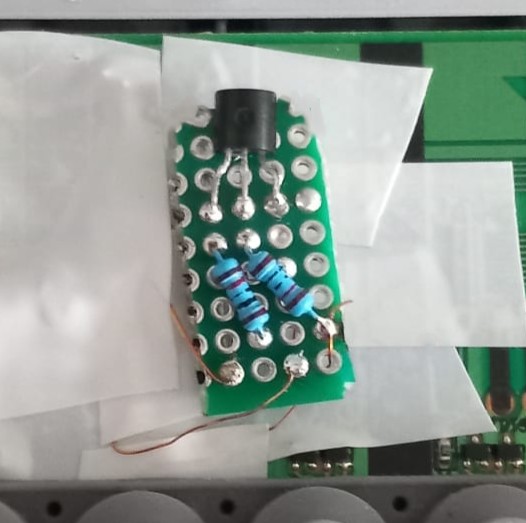
BC547 + 2 × 10 kΩ on perfboard, soldered into the original circuit with fine wires.
With this repair, all the keys worked again.
The main PCB: JTAG, MIDI, SERIAL I/F and Option
While opening up the piano, I also came across the main PCB. The first things that caught my attention were the unused headers labelled JTAG, MIDI, SERIAL I/F and Option. That is a rather tempting set of labels to find inside a digital piano:
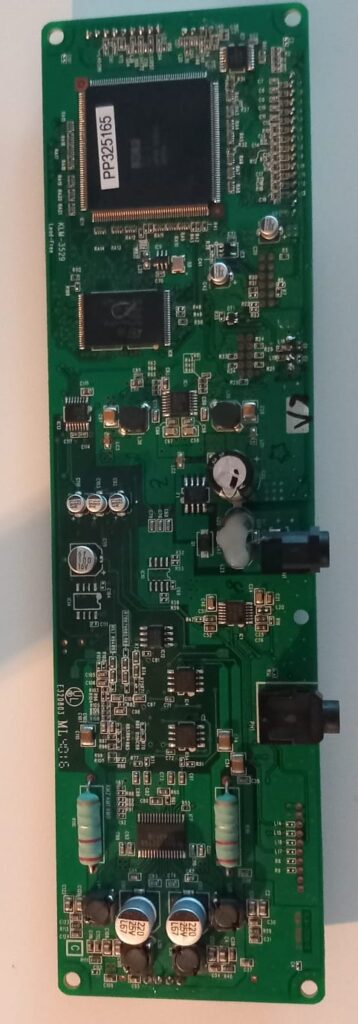
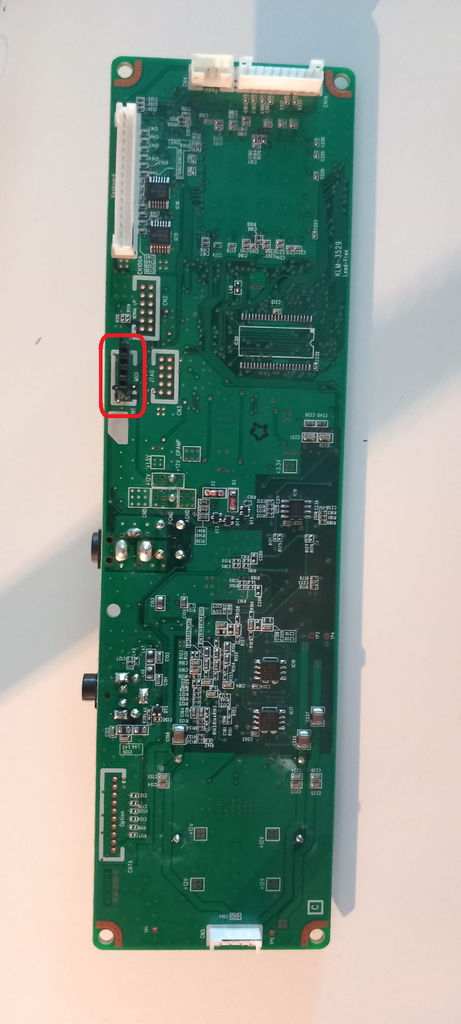
The JTAG-labelled header is particularly interesting for further investigation. A standard JTAG Test Access Port uses TCK, TMS, TDI and TDO: a test clock, mode-select input, serial data input and serial data output. JTAG is used for boundary-scan testing and, depending on the processor and implementation, debugging or programming. I have not mapped or tested the B1 header. Maybe I will try firmware extraction in the future.
SERIAL I/F suggests another serial interface, but I do not know what it is ur what it is used for. A quick Google search also yields nothing.
Finding a MIDI header was surprising because the B1 has no external MIDI port. The later Korg B2 does provide USB-MIDI and USB audio, but it is not the same main PCB. The interesting question was whether the B1’s MIDI-labelled connection was actually active.
Probing the five-pin MIDI header
I soldered female headers onto the board and hooked up my logic analyzer to investigate all five pins in PulseView. To my surprise, there was activity on pin 3 (the middle pin).
I enabled the MIDI decoder in PulseView, and the signal decoded into MIDI events. One of the messages in the capture was:
Channel 3: note off (note = 68 'G#4', velocity = 1)
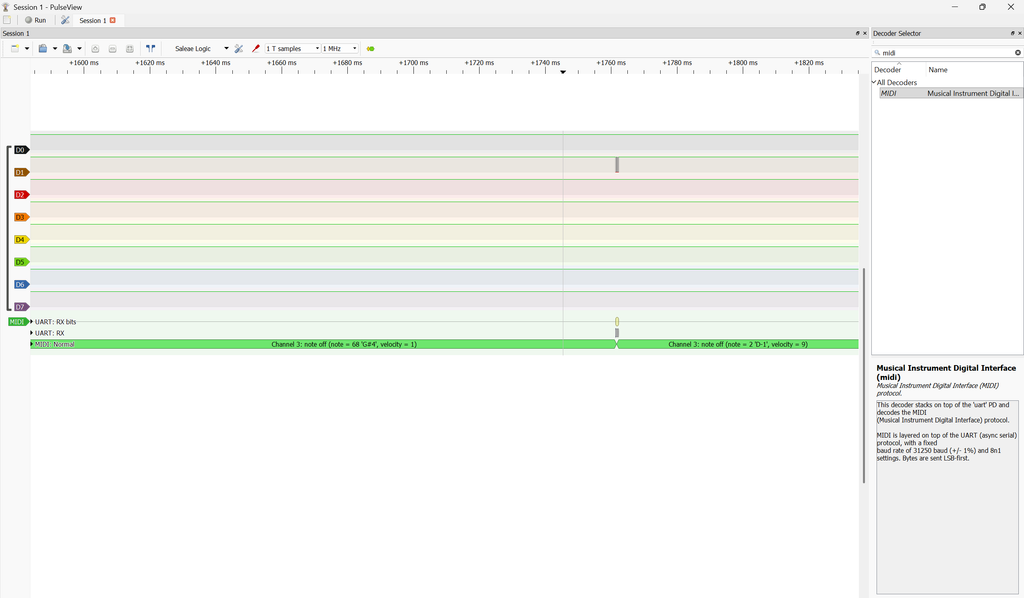
For serial MIDI, the UART framing is 31,250 baud, 8 data bits, no parity and one stop bit. The data bits are transmitted MSB first. Including the start and stop bits, each byte takes 10 bit periods: 32 µs per bit and 320 µs per byte. A three-byte channel message therefore occupies 960 µs on the wire when all three bytes are transmitted, excluding gaps.
The G♯4 label is PulseView’s note-name representation; the unambiguous value is note number 68. The final byte is release velocity, not the attack velocity of the preceding Note On. Another detail for a software bridge is that Note On with velocity zero also means Note Off, so a receiver must handle both forms.
This was the useful discovery: the B1 was already generating MIDI data internally. The existing firmware was doing the key scanning and velocity processing, and I could tap the resulting event stream instead of implementing a separate keyboard scanner.
Using the logic analyzer as a MIDI input
I had ChatGPT write a Python program to use the logic analyzer as a MIDI input. It worked well in my setup. The analyzer captured the internal signal, and the Python bridge made the MIDI messages available on the computer.
The signal path is effectively: keyboard contacts → piano scan/velocity processing → internal MIDI stream → logic analyzer → Python bridge → computer MIDI destination.
# Usage and installing the script
# Download and extract the files, then go to the directory
# Run these commands:
pip install -r requirements.txt
python3 midi_bridge.py
The internal five-pin header should not be confused with a five-pin DIN connector. The same MIDI byte stream can exist at a logic node, while the external DIN interface uses a current loop and an optically isolated receiver. The MIDI electrical specification is the reference for that interface. Before replacing the analyzer with hardware, I would measure the header’s logic levels, identify ground and verify the remaining pins; I have not established those details here.
For now, the result is a repaired Korg B1 with a working MIDI output path through a logic analyzer and Python. I have not tested receiving MIDI into the piano or measured the bridge latency. The other headers, especially JTAG and SERIAL I/F, remain interesting targets for another project.
It is a shame that Korg did not expose MIDI on this otherwise beautiful piano.
Geef een reactie